> ## Documentation Index
> Fetch the complete documentation index at: https://docs.corsa.finance/llms.txt
> Use this file to discover all available pages before exploring further.
# API Authentication - Keys, Tokens & Rate Limits
> Create API keys, authenticate requests, and understand rate limits for the Corsa compliance API.
All requests to the Corsa API must be authenticated using an API key. API keys are created in the **Developers Hub** within the Corsa dashboard.
## Creating an API Key
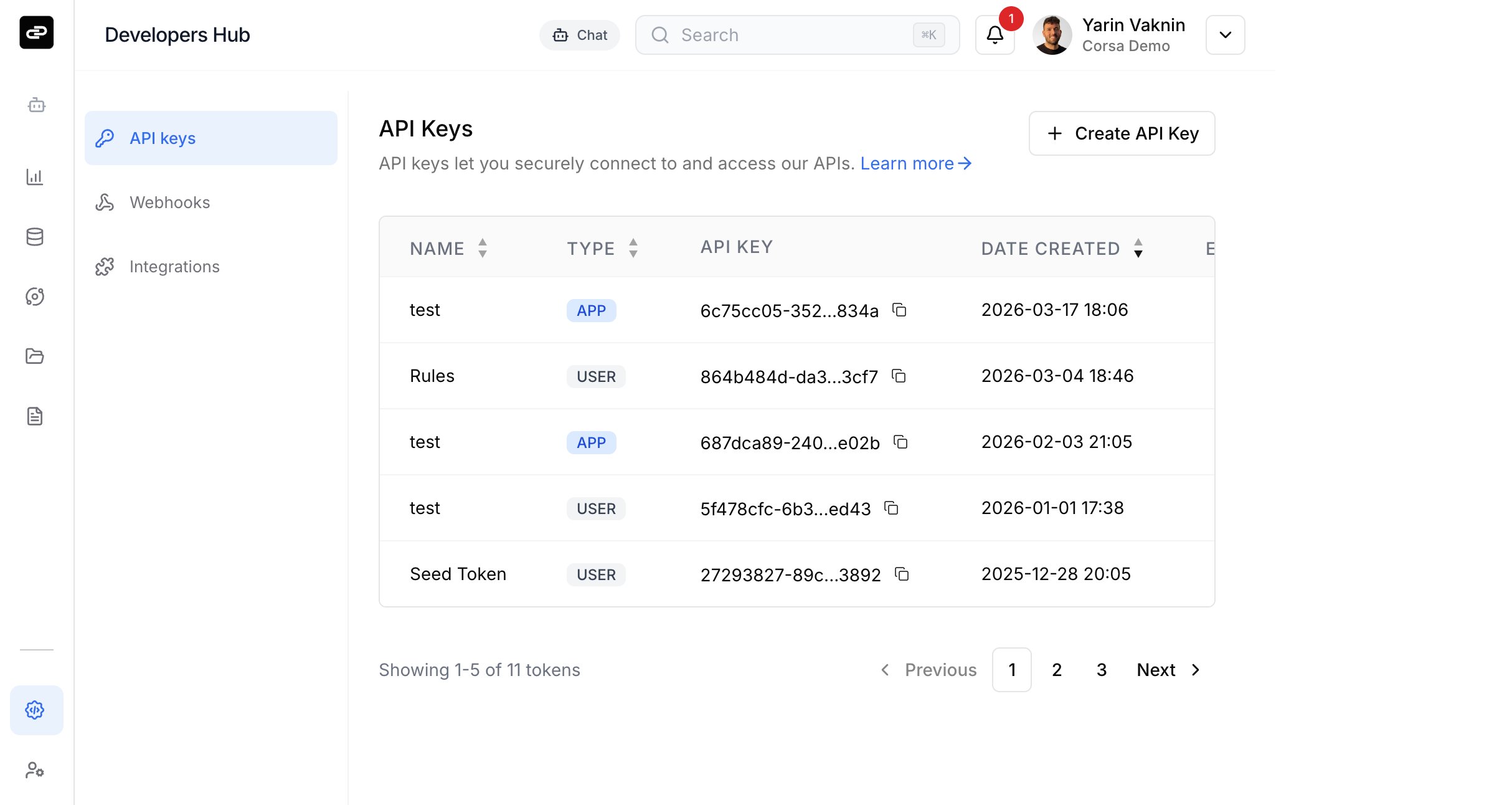
1. Log in to the Corsa dashboard.
2. Navigate to **Developers Hub** from the sidebar.
3. Select the **API keys** tab.
4. Click **Create API Key**.
 ### Configure Your Key
In the creation dialog, fill in the following:
### Configure Your Key
In the creation dialog, fill in the following:
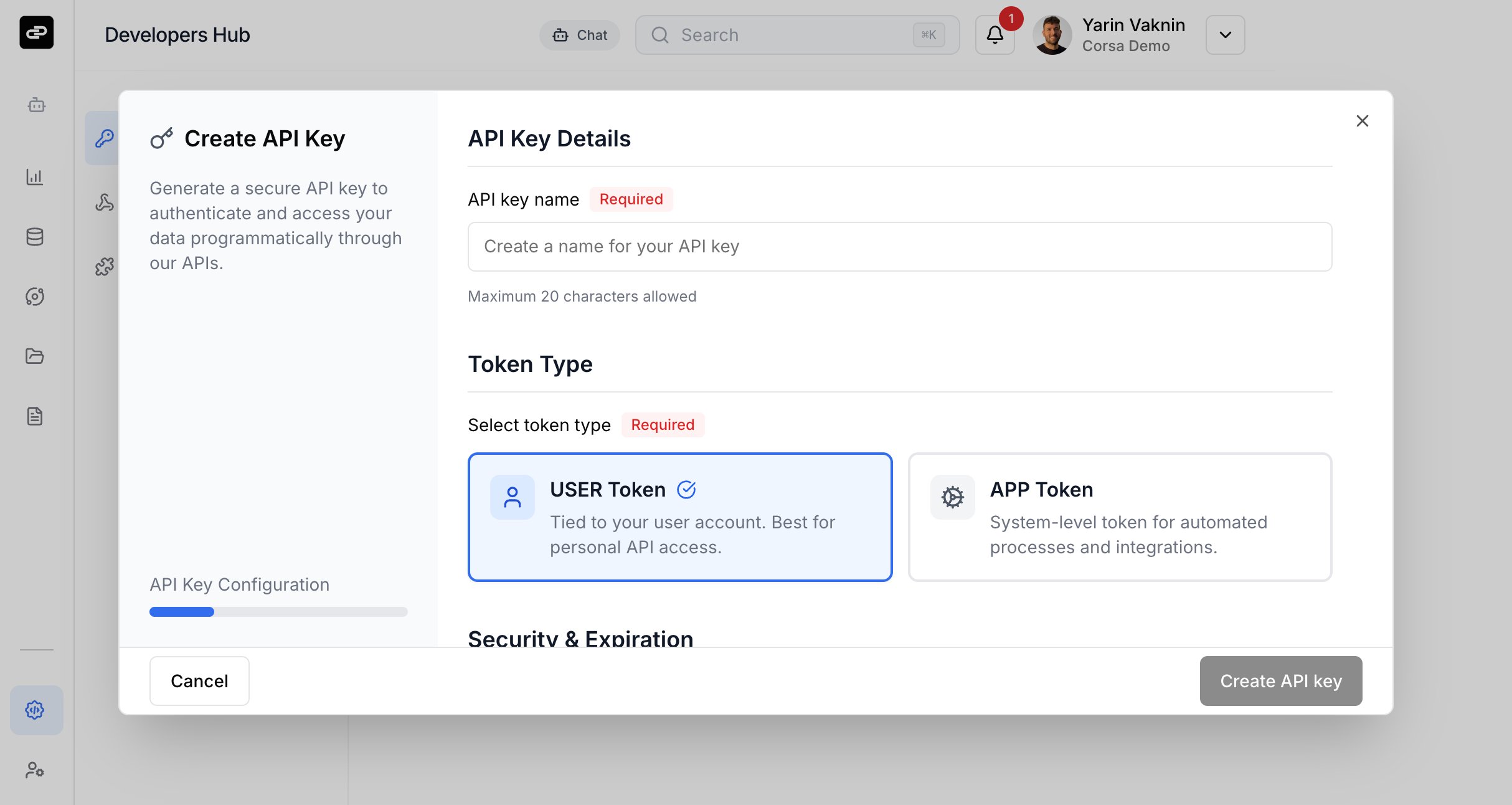 **API key name** (required) - A descriptive name for the key (max 20 characters).
**Token type** (required) - Choose the type of token:
| Type | Description |
| -------- | -------------------------------------------------------------------------------------------- |
| **USER** | Tied to your user account. Best for personal API access. |
| **APP** | System-level token for automated processes and integrations. Requires Owner or Support role. |
**Expiration period** (required) - Choose when the key should expire:
* 7 days
* 30 days
* 90 days
* 1 year
* No expiration
* Custom expiration date
Click **Create API key** to generate the credentials.
### Save Your Credentials
After creation, you will be shown:
* **API Token** - Your public key identifier.
* **API Secret** - Your private secret key.
The API Secret is only shown once. Copy and store both values securely before closing the dialog.
## Authenticating Requests
All API requests are authenticated using a **Bearer token** in the `Authorization` header. The token is formed by combining your API Token and API Secret with a colon separator.
```bash theme={null}
curl -X GET "https://api.corsa.finance/v1/your-endpoint" \
-H "Authorization: Bearer :" \
-H "Content-Type: application/json"
```
### Using the Node.js SDK
When using the [Node.js SDK](/sdk/installation), pass the credentials in the constructor:
```typescript theme={null}
import { CorsaClient } from '@corsa-labs/sdk';
const client = new CorsaClient({
BASE: "https://api.corsa.finance",
HEADERS: {
"Authorization": `Bearer ${process.env.API_TOKEN}:${process.env.API_SECRET}`
}
});
```
Or configure the global `OpenAPI` object:
```typescript theme={null}
import { CorsaClient, OpenAPI } from '@corsa-labs/sdk';
OpenAPI.BASE = 'https://api.corsa.finance';
OpenAPI.HEADERS = {
"Authorization": `Bearer ${process.env.API_TOKEN}:${process.env.API_SECRET}`
};
const client = new CorsaClient();
```
### Using the Python SDK
When using the [Python SDK](/sdk/python-installation), pass the credentials in the constructor:
```python theme={null}
import os
from corsa_sdk import CorsaClient
client = CorsaClient(
base_url="https://api.corsa.finance",
token=f"{os.environ['API_TOKEN']}:{os.environ['API_SECRET']}",
)
http = client.raw_client.get_httpx_client()
```
## Managing API Keys
From the API keys page, you can:
* **View** all active keys with their name, type, token (truncated), creation date, and expiration status.
* **Edit** a key's name.
* **Revoke** a key to immediately disable access.
## Rate Limiting
All API requests are subject to rate limiting to ensure fair usage and platform stability.
| Parameter | Value |
| --------------- | ------------------------------------- |
| **Rate limit** | 500 requests per 60 seconds |
| **Scope** | Per user (based on JWT user ID) |
| **Status code** | `429 Too Many Requests` when exceeded |
All requests are counted toward the limit, including successful responses (2xx, 3xx), client errors (4xx), and server errors (5xx).
### Response Headers
Every API response includes the following headers:
| Header | Description |
| -------------- | -------------------------------------------------------------------------------------------------------------------------------------------------------------------- |
| `RateLimit` | Rate limit status in the format `limit-in-window; r=remaining; t=timewindow` ([RFC draft-8](https://datatracker.ietf.org/doc/draft-ietf-httpapi-ratelimit-headers/)) |
| `Retry-After` | Seconds to wait before retrying (only present when rate limited) |
| `X-Request-ID` | Request correlation ID for debugging |
## Base URL
| Region | Base URL |
| ------ | ------------------------------ |
| US | `https://api.corsa.finance` |
| EU | `https://api.eu.corsa.finance` |
Full API endpoint details are available in the [API Reference](https://api.corsa.finance/api-spec.json) (requires API credentials).
**API key name** (required) - A descriptive name for the key (max 20 characters).
**Token type** (required) - Choose the type of token:
| Type | Description |
| -------- | -------------------------------------------------------------------------------------------- |
| **USER** | Tied to your user account. Best for personal API access. |
| **APP** | System-level token for automated processes and integrations. Requires Owner or Support role. |
**Expiration period** (required) - Choose when the key should expire:
* 7 days
* 30 days
* 90 days
* 1 year
* No expiration
* Custom expiration date
Click **Create API key** to generate the credentials.
### Save Your Credentials
After creation, you will be shown:
* **API Token** - Your public key identifier.
* **API Secret** - Your private secret key.
The API Secret is only shown once. Copy and store both values securely before closing the dialog.
## Authenticating Requests
All API requests are authenticated using a **Bearer token** in the `Authorization` header. The token is formed by combining your API Token and API Secret with a colon separator.
```bash theme={null}
curl -X GET "https://api.corsa.finance/v1/your-endpoint" \
-H "Authorization: Bearer :" \
-H "Content-Type: application/json"
```
### Using the Node.js SDK
When using the [Node.js SDK](/sdk/installation), pass the credentials in the constructor:
```typescript theme={null}
import { CorsaClient } from '@corsa-labs/sdk';
const client = new CorsaClient({
BASE: "https://api.corsa.finance",
HEADERS: {
"Authorization": `Bearer ${process.env.API_TOKEN}:${process.env.API_SECRET}`
}
});
```
Or configure the global `OpenAPI` object:
```typescript theme={null}
import { CorsaClient, OpenAPI } from '@corsa-labs/sdk';
OpenAPI.BASE = 'https://api.corsa.finance';
OpenAPI.HEADERS = {
"Authorization": `Bearer ${process.env.API_TOKEN}:${process.env.API_SECRET}`
};
const client = new CorsaClient();
```
### Using the Python SDK
When using the [Python SDK](/sdk/python-installation), pass the credentials in the constructor:
```python theme={null}
import os
from corsa_sdk import CorsaClient
client = CorsaClient(
base_url="https://api.corsa.finance",
token=f"{os.environ['API_TOKEN']}:{os.environ['API_SECRET']}",
)
http = client.raw_client.get_httpx_client()
```
## Managing API Keys
From the API keys page, you can:
* **View** all active keys with their name, type, token (truncated), creation date, and expiration status.
* **Edit** a key's name.
* **Revoke** a key to immediately disable access.
## Rate Limiting
All API requests are subject to rate limiting to ensure fair usage and platform stability.
| Parameter | Value |
| --------------- | ------------------------------------- |
| **Rate limit** | 500 requests per 60 seconds |
| **Scope** | Per user (based on JWT user ID) |
| **Status code** | `429 Too Many Requests` when exceeded |
All requests are counted toward the limit, including successful responses (2xx, 3xx), client errors (4xx), and server errors (5xx).
### Response Headers
Every API response includes the following headers:
| Header | Description |
| -------------- | -------------------------------------------------------------------------------------------------------------------------------------------------------------------- |
| `RateLimit` | Rate limit status in the format `limit-in-window; r=remaining; t=timewindow` ([RFC draft-8](https://datatracker.ietf.org/doc/draft-ietf-httpapi-ratelimit-headers/)) |
| `Retry-After` | Seconds to wait before retrying (only present when rate limited) |
| `X-Request-ID` | Request correlation ID for debugging |
## Base URL
| Region | Base URL |
| ------ | ------------------------------ |
| US | `https://api.corsa.finance` |
| EU | `https://api.eu.corsa.finance` |
Full API endpoint details are available in the [API Reference](https://api.corsa.finance/api-spec.json) (requires API credentials).