> ## Documentation Index
> Fetch the complete documentation index at: https://docs.corsa.finance/llms.txt
> Use this file to discover all available pages before exploring further.
# Client Data Store - Unified KYC/KYB Profiles
> Unified view of all your clients with risk scoring, status tracking, and deep compliance context across individuals and corporates.
The Clients page gives your team a single view of every onboarded individual and corporate - with risk scores, onboarding status, and compliance history at a glance.
 ## Client List
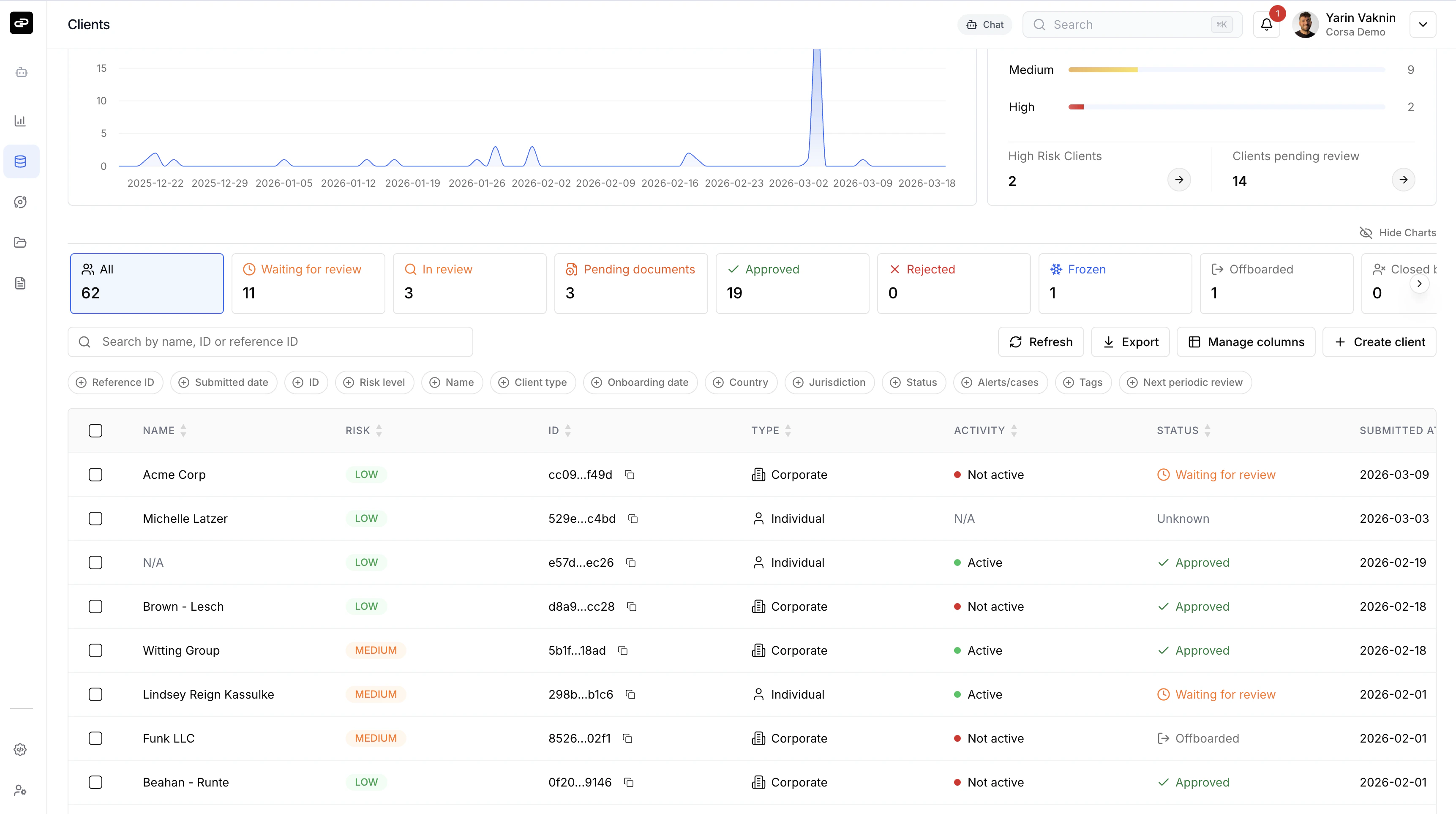
Filter clients using **status tabs** - Waiting for review, In review, Pending documents, Approved, Rejected, Frozen, Offboarded, and Closed by client. Each tab shows a count so you know where attention is needed.
The table is fully customizable. Use **Manage columns** to pick the fields you care about - name, risk level, client type, country, alerts/cases, tags, next periodic review, and more. Every column is sortable and filterable.
Toggle **Show Charts** for visual dashboards: client submission volume over time and a risk distribution snapshot.
You can search by name, ID, or reference ID, export the current view, or create a new client directly from the toolbar.
## Client Profile
Click any client to open their full profile.
## Client List
Filter clients using **status tabs** - Waiting for review, In review, Pending documents, Approved, Rejected, Frozen, Offboarded, and Closed by client. Each tab shows a count so you know where attention is needed.
The table is fully customizable. Use **Manage columns** to pick the fields you care about - name, risk level, client type, country, alerts/cases, tags, next periodic review, and more. Every column is sortable and filterable.
Toggle **Show Charts** for visual dashboards: client submission volume over time and a risk distribution snapshot.
You can search by name, ID, or reference ID, export the current view, or create a new client directly from the toolbar.
## Client Profile
Click any client to open their full profile.
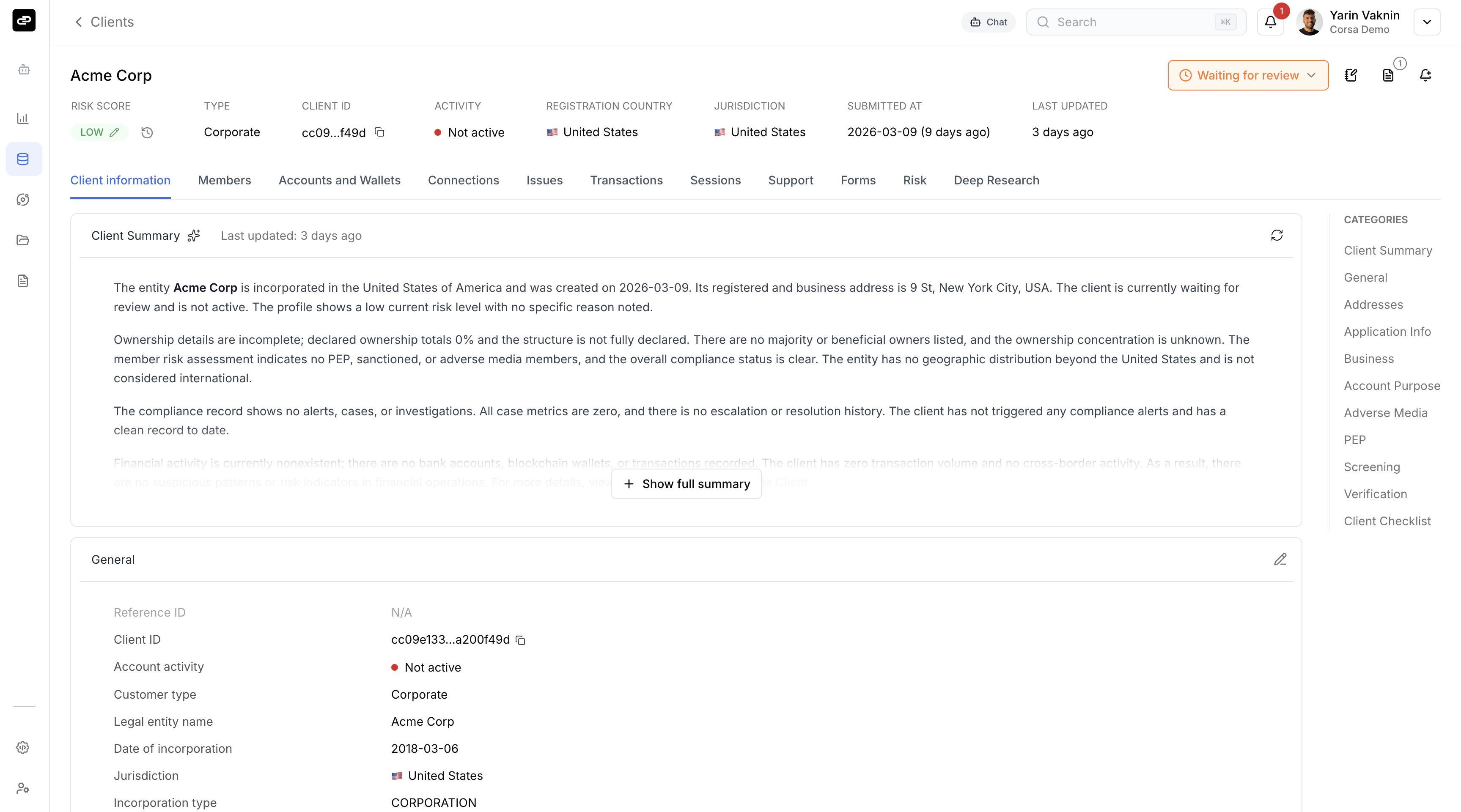 The profile header shows the client's name, status, risk score, type, and account activity. Below that, an **AI-generated summary** synthesizes everything Corsa knows - entity details, ownership, compliance history, and financial activity.
Use the tabs to navigate across the client's data:
* **Client information** - General details, addresses, business info, source of funds, screening results, verification documents.
* **Members** - Directors, shareholders, and UBOs (for corporate clients).
* **Accounts and Wallets** - Linked bank accounts and blockchain wallets.
* **Transactions** - Full transaction history.
* **Risk** - Risk assessment breakdown and scoring factors.
* **Deep Research** - AI-powered open-source research reports.
* Plus: Connections, Issues, Sessions, Support, and Forms.
## Creating a Client
Click **Create client** to walk through a 3-step wizard: basic details, general information, and address. You can also skip and create an empty shell to fill in later.
Clients can also be created via the [REST API](/api/ingesting-clients) or [SDK](/sdk/available-services).
The profile header shows the client's name, status, risk score, type, and account activity. Below that, an **AI-generated summary** synthesizes everything Corsa knows - entity details, ownership, compliance history, and financial activity.
Use the tabs to navigate across the client's data:
* **Client information** - General details, addresses, business info, source of funds, screening results, verification documents.
* **Members** - Directors, shareholders, and UBOs (for corporate clients).
* **Accounts and Wallets** - Linked bank accounts and blockchain wallets.
* **Transactions** - Full transaction history.
* **Risk** - Risk assessment breakdown and scoring factors.
* **Deep Research** - AI-powered open-source research reports.
* Plus: Connections, Issues, Sessions, Support, and Forms.
## Creating a Client
Click **Create client** to walk through a 3-step wizard: basic details, general information, and address. You can also skip and create an empty shell to fill in later.
Clients can also be created via the [REST API](/api/ingesting-clients) or [SDK](/sdk/available-services).