All requests to the Corsa API must be authenticated using an API key. API keys are created in the Developers Hub within the Corsa dashboard.
Creating an API Key
- Log in to the Corsa dashboard.
- Navigate to Developers Hub from the sidebar.
- Select the API keys tab.
- Click Create API Key.
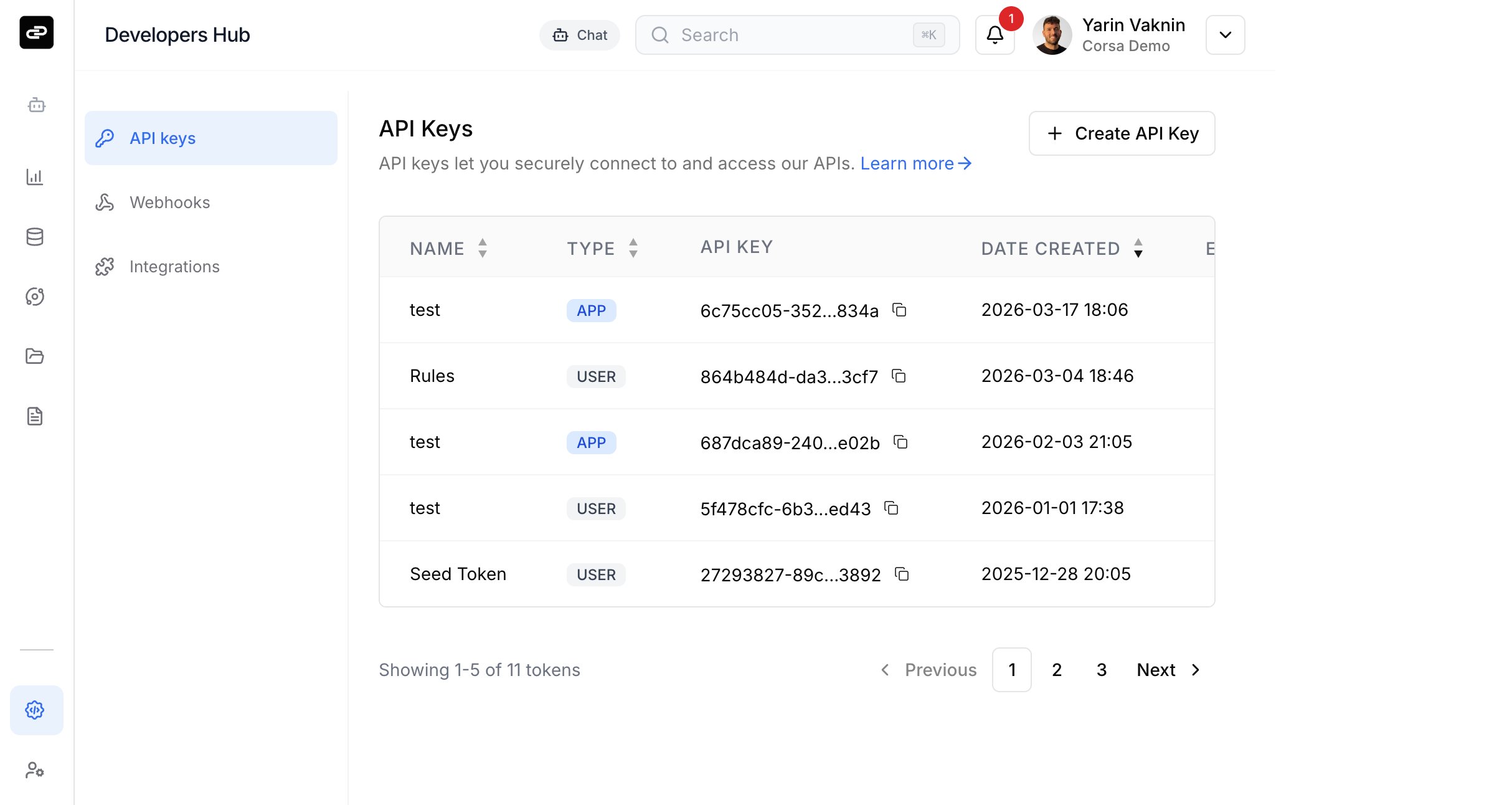
In the creation dialog, fill in the following:
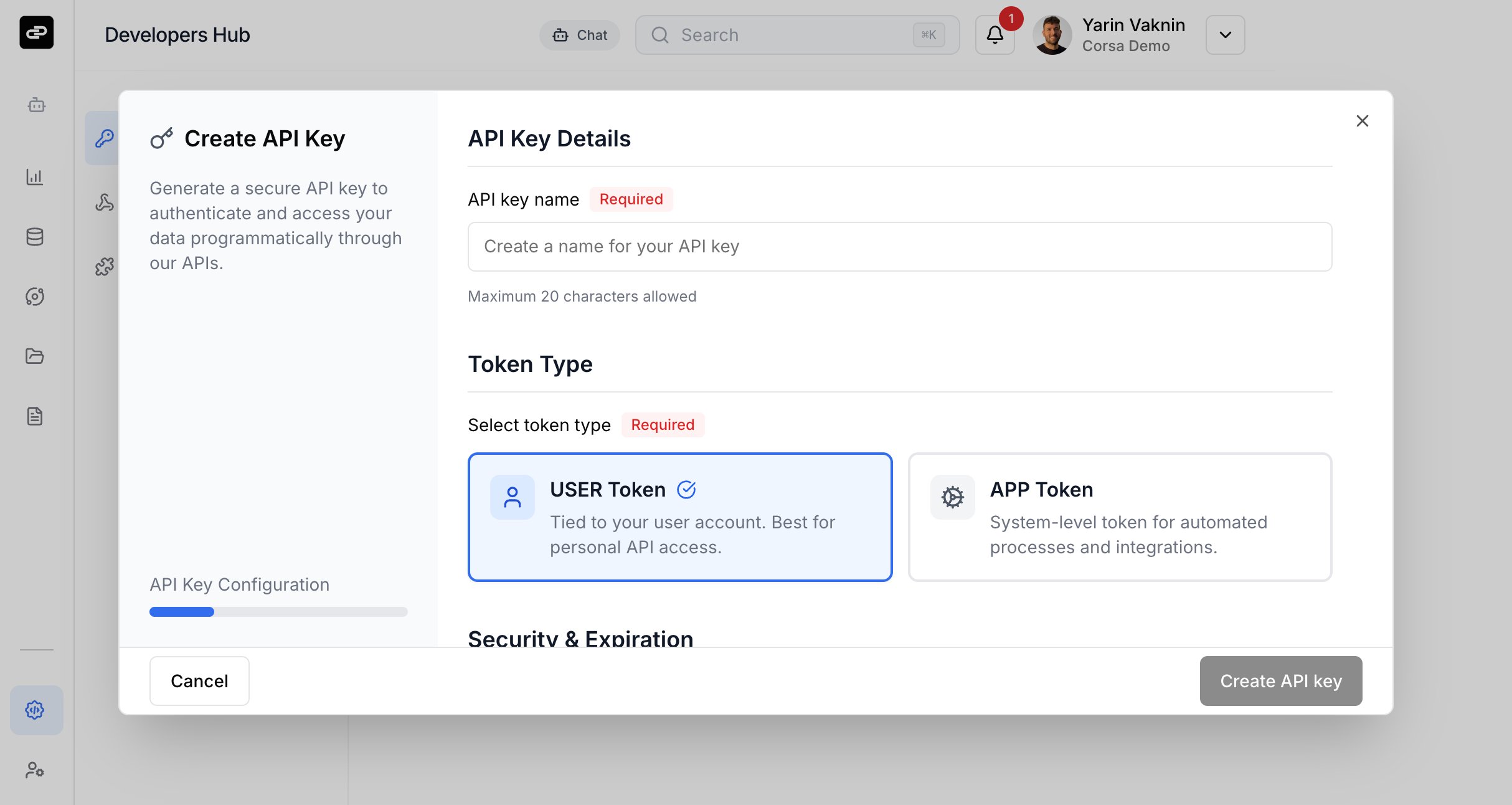
API key name (required) - A descriptive name for the key (max 20 characters).
Token type (required) - Choose the type of token:
| Type | Description |
|---|
| USER | Tied to your user account. Best for personal API access. |
| APP | System-level token for automated processes and integrations. Requires Owner or Support role. |
Expiration period (required) - Choose when the key should expire:
- 7 days
- 30 days
- 90 days
- 1 year
- No expiration
- Custom expiration date
Click Create API key to generate the credentials.
Save Your Credentials
After creation, you will be shown:
- API Token - Your public key identifier.
- API Secret - Your private secret key.
The API Secret is only shown once. Copy and store both values securely before closing the dialog.
Authenticating Requests
All API requests are authenticated using a Bearer token in the Authorization header. The token is formed by combining your API Token and API Secret with a colon separator.
curl -X GET "https://api.corsa.finance/v1/your-endpoint" \
-H "Authorization: Bearer <API_TOKEN>:<API_SECRET>" \
-H "Content-Type: application/json"
Using the SDK
When using the Corsa SDK, pass the credentials in the constructor:
import { CorsaClient } from '@corsa-labs/sdk';
const client = new CorsaClient({
BASE: "https://api.corsa.finance",
HEADERS: {
"Authorization": `Bearer ${process.env.API_TOKEN}:${process.env.API_SECRET}`
}
});
Or configure the global OpenAPI object:
import { CorsaClient, OpenAPI } from '@corsa-labs/sdk';
OpenAPI.BASE = 'https://api.corsa.finance';
OpenAPI.HEADERS = {
"Authorization": `Bearer ${process.env.API_TOKEN}:${process.env.API_SECRET}`
};
const client = new CorsaClient();
Managing API Keys
From the API keys page, you can:
- View all active keys with their name, type, token (truncated), creation date, and expiration status.
- Edit a key’s name.
- Revoke a key to immediately disable access.
Rate Limiting
All API requests are subject to rate limiting to ensure fair usage and platform stability.
| Parameter | Value |
|---|
| Rate limit | 500 requests per 60 seconds |
| Scope | Per user (based on JWT user ID) |
| Status code | 429 Too Many Requests when exceeded |
All requests are counted toward the limit, including successful responses (2xx, 3xx), client errors (4xx), and server errors (5xx).
Every API response includes the following headers:
| Header | Description |
|---|
RateLimit | Rate limit status in the format limit-in-window; r=remaining; t=timewindow (RFC draft-8) |
Retry-After | Seconds to wait before retrying (only present when rate limited) |
X-Request-ID | Request correlation ID for debugging |
Base URL
| Region | Base URL |
|---|
| US | https://api.corsa.finance |
| EU | https://api.eu.corsa.finance |
Full API endpoint documentation is available in the API Reference.